Free and open source · Stable release

Every repo. One window. AI you can trust.

IntelyIDE is a fast, lightweight desktop IDE for people who work across several git repositories at once. AI agents help with the work. They can read and edit, but they never commit or push. You do.

Download for macOSVersion 1.0.1 · .dmg · 16 MB

Requires macOS 13.5 or later. Built for Intel Macs (x64). It also runs on Apple Silicon under Rosetta 2. A native Apple Silicon build is planned.

Other downloads and checksums
FileArchitectureSizeSHA-256
IntelyIDE_1.0.1_x64.dmg Intel (x64) 16 MB 6bf957750e8aa2c695c0da2a6eadce724a5d7f7b9a87b944b5886d6043f519f5

All downloads and checksums

IntelyIDE main window showing the multi-repository Changes tree next to an editor and an agent panel.

Highlights

Why IntelyIDE

  • Many repos, one view

    Changes from every repository sit in one grouped tree. Review, commit and push across all of them without switching windows.

  • Agents that stay in their lane

    Agents can read and edit files. They cannot commit or push. Every run starts with a Rewind snapshot, so one click undoes it.

  • Light and fast

    A native shell built with Rust and Tauri, not Electron. Designed to stay light and responsive while you work.

What you get

Every repository’s changes in one tree

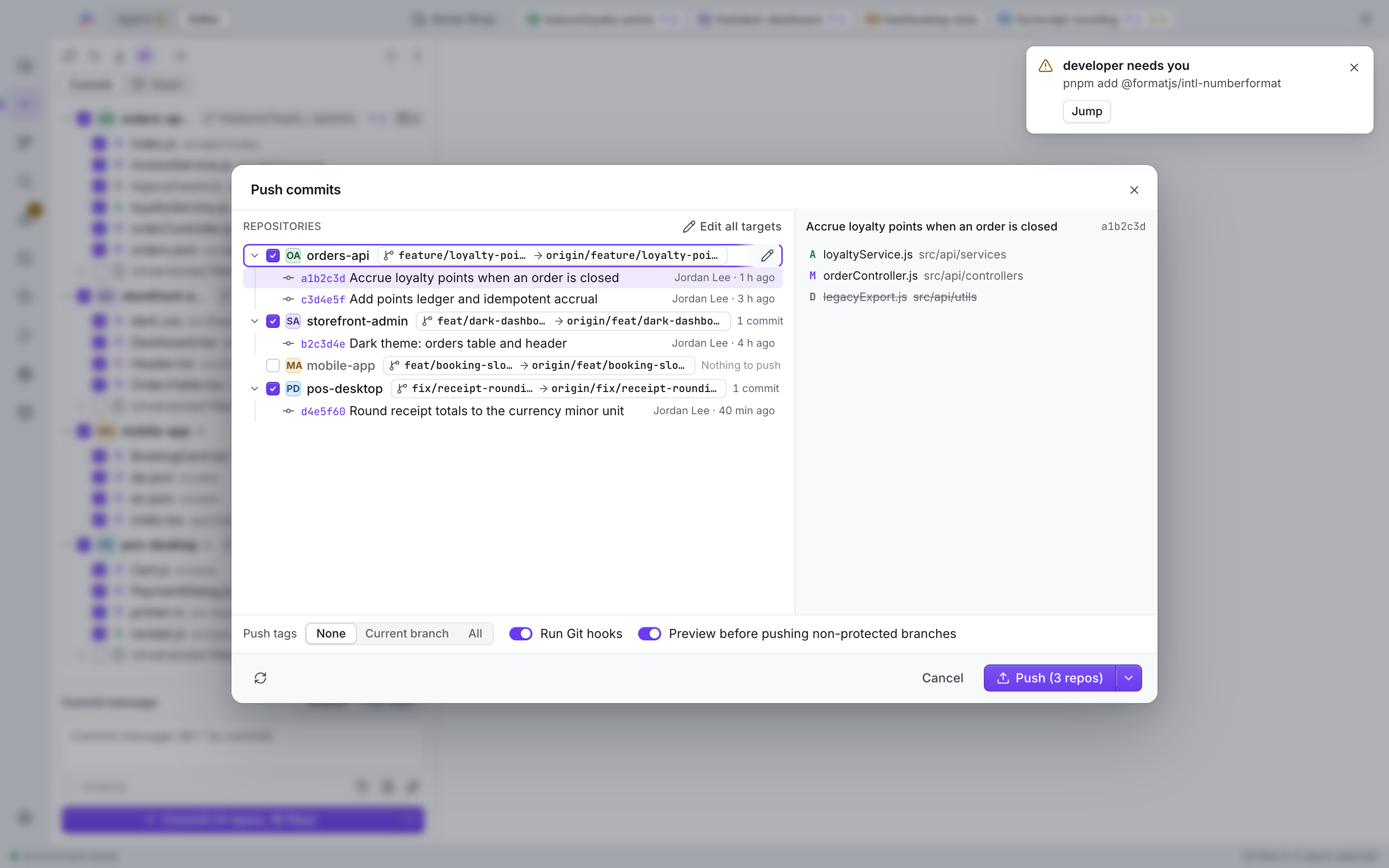
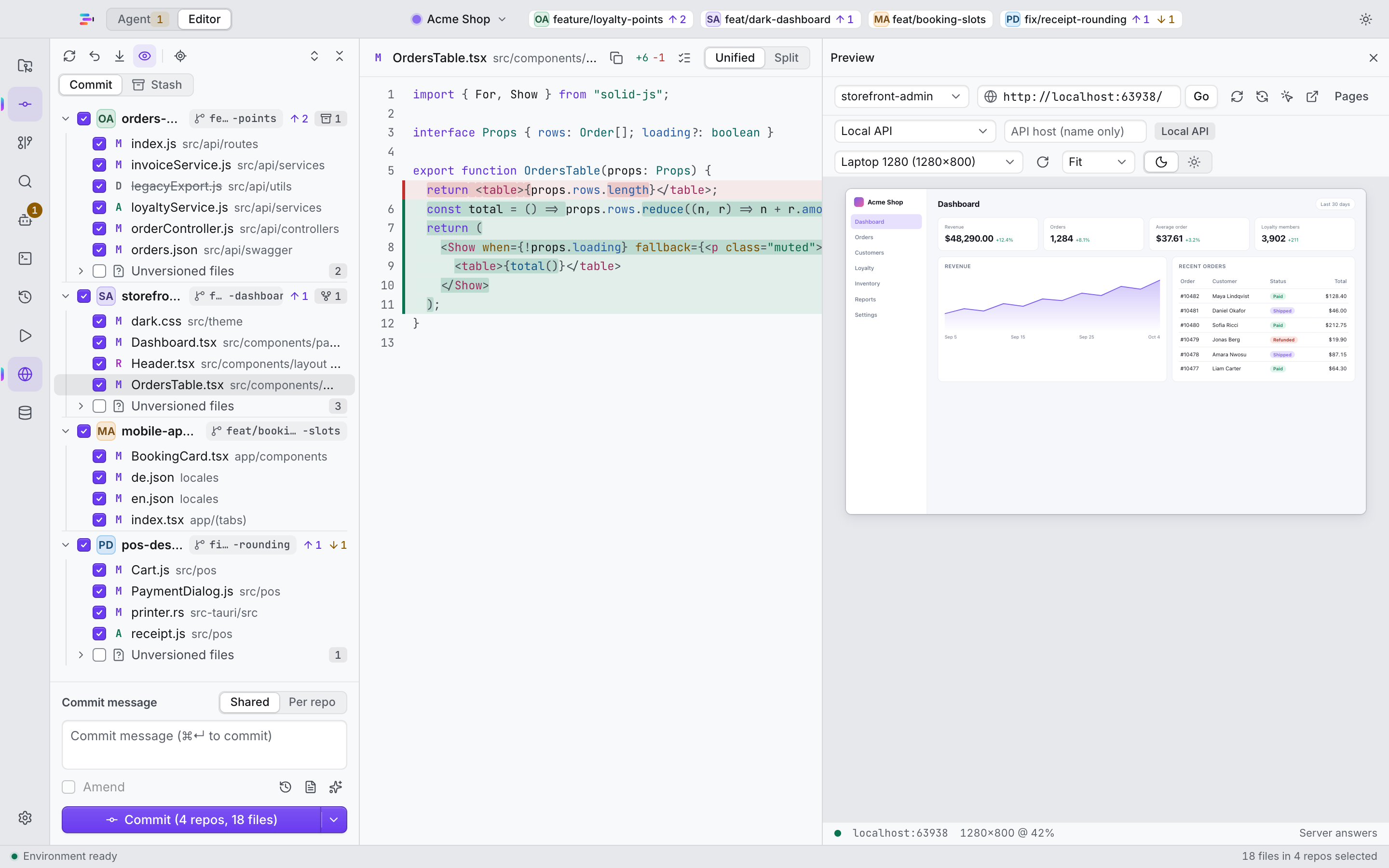
The Changes tree groups changes by repository, each with a repo badge, a branch pill and tri-state checkboxes. Pick what to stage, write one commit message for everything or one per repo, then push from a dialog with a checkbox for each repository.

  • Commit graph, blame and hunk staging
  • Interactive rebase, cherry-pick and stash
  • Pre-commit checks and a warning when a secret shows up in a diff
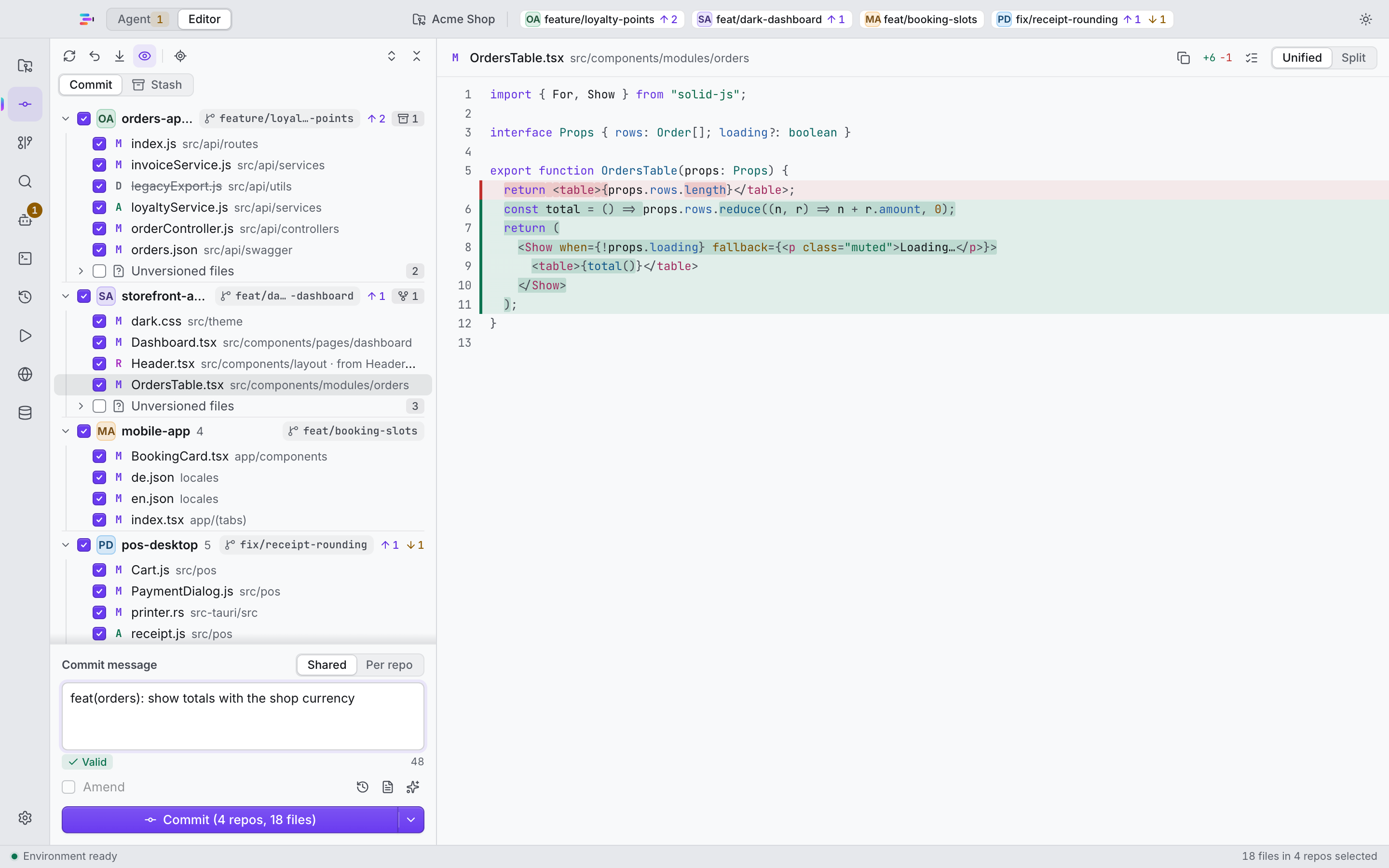
The Changes tree with four repositories and their changes grouped by repository.
The push dialog with one checkbox for each repository.

AI agents with guardrails

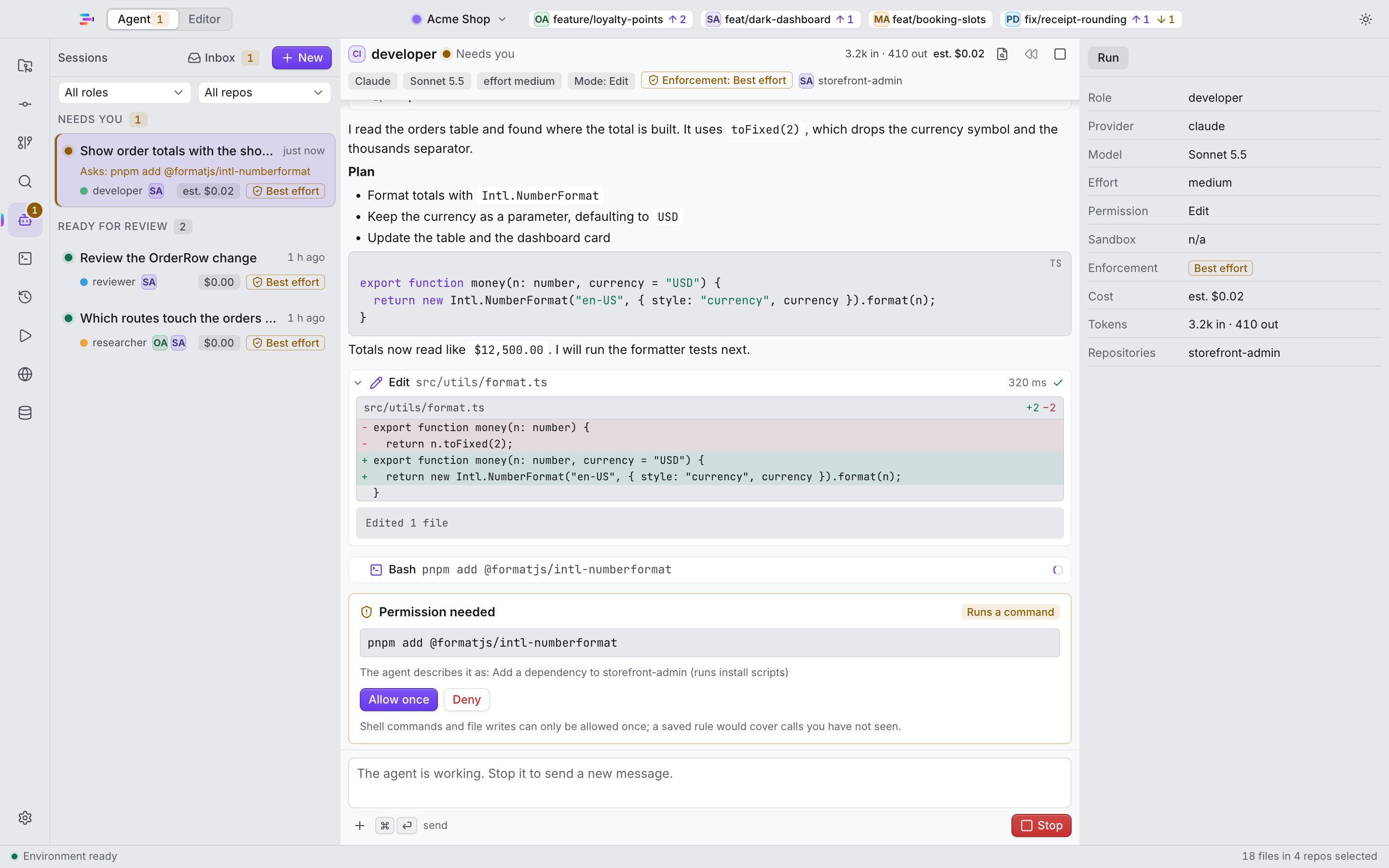
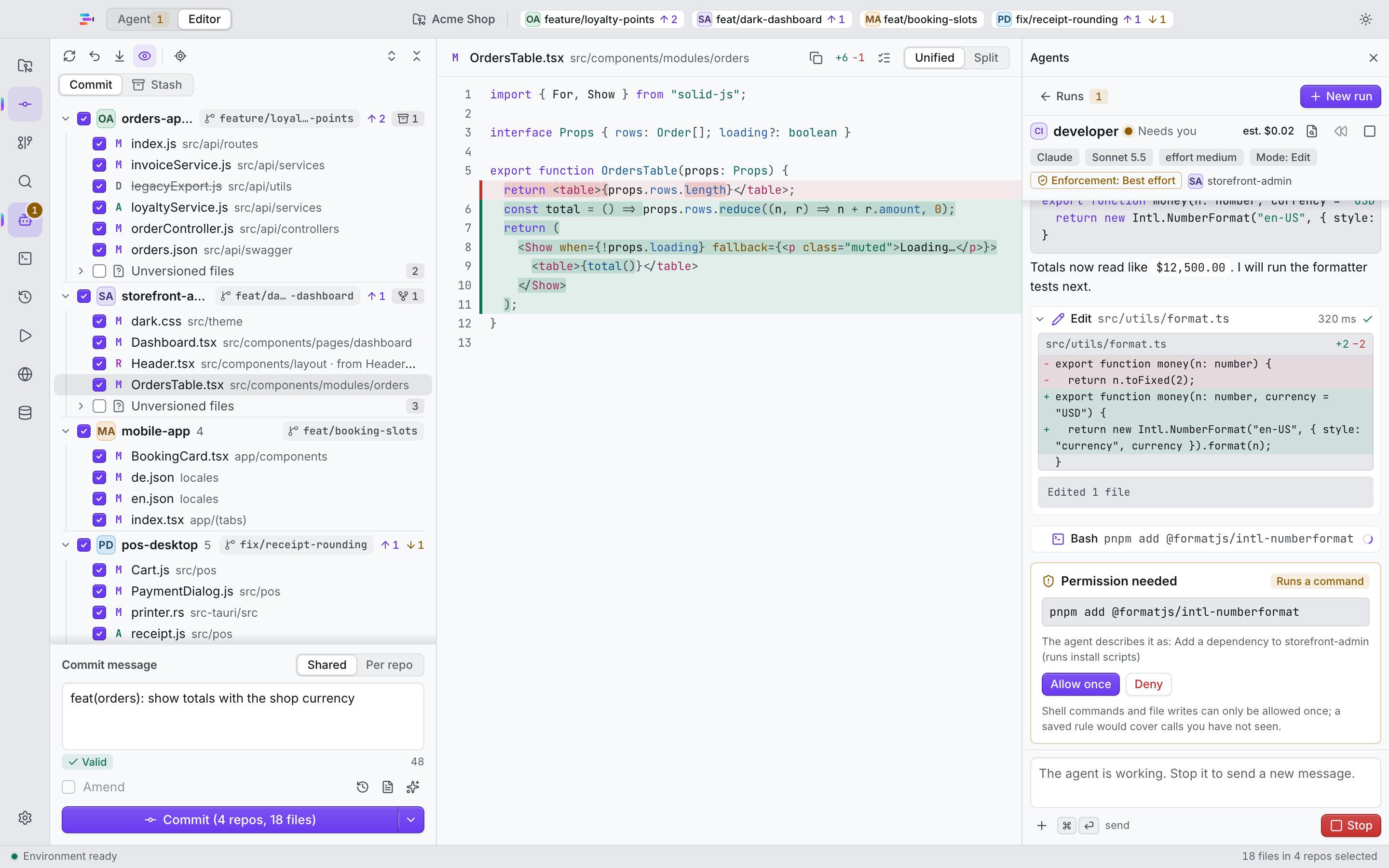
Agents run in roles, and each role has its own model and effort. They can read and edit files. They cannot commit or push. A “needs you” inbox collects every approval that is waiting for you.

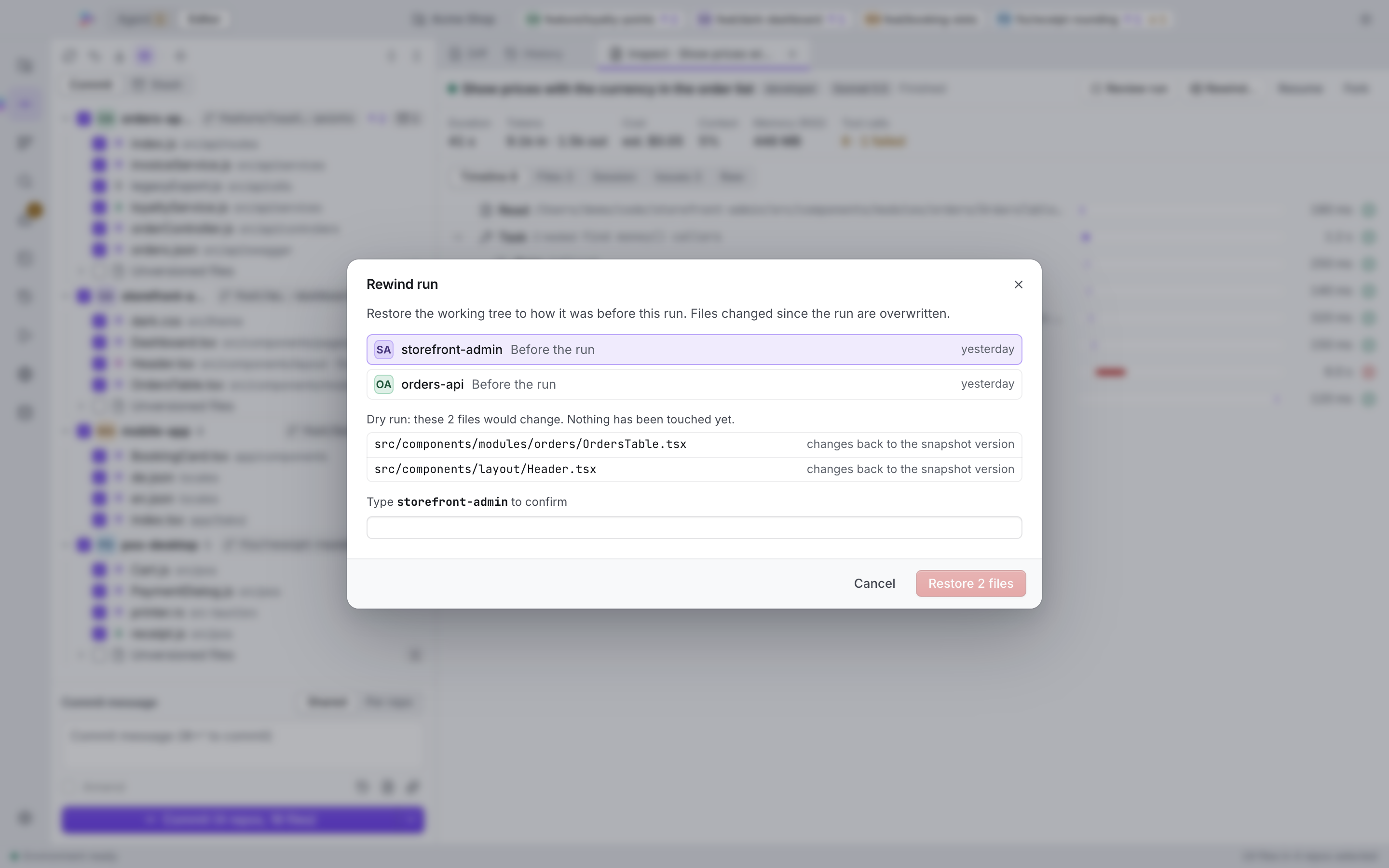
  • Every run starts with a Rewind snapshot. One click undoes it.
  • Enforced in several layers: permission policy, hard stops, a git shim and hooks.
  • Uses your own Claude Code setup. The app guides you through it.

IntelyIDE does not ship Claude Code. Anthropic does not endorse IntelyIDE.

An agent safety card showing an approval waiting in the needs-you inbox.
The Rewind view showing the snapshot taken when an agent run started.

Workspaces and a welcome screen

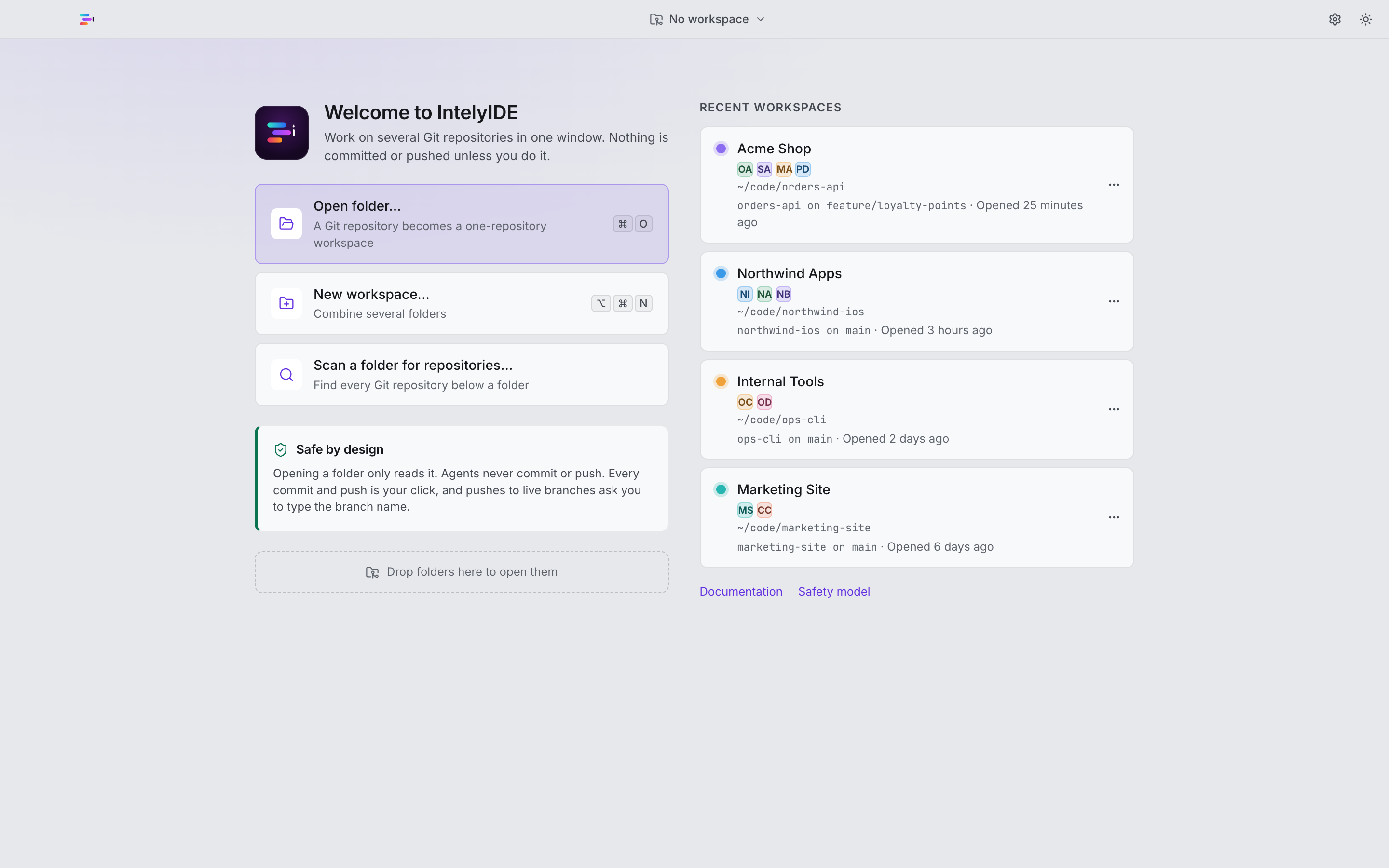
A workspace is a named set of repositories. Keep as many as you like and switch between them. The welcome screen lists recent workspaces and lets you open a folder or scan a folder for repositories.

  • Workspace switcher
  • Open folder or scan for repositories
  • Worktrees and branch hygiene
The welcome screen with recent workspaces and the workspace switcher.

Run, preview, click to source

The run panel starts your dev server and shows a live preview next to the code. Click an element in the preview to jump to its source. Component preview is built in too.

  • Editor, terminal, search and diff in the same window
  • Live dev-server preview
  • Click-to-source and component preview
The run panel with a live dev-server preview and click-to-source.

Remote: watch from your phone

Experimental: not yet verified against a real Cloudflare account or iPhone

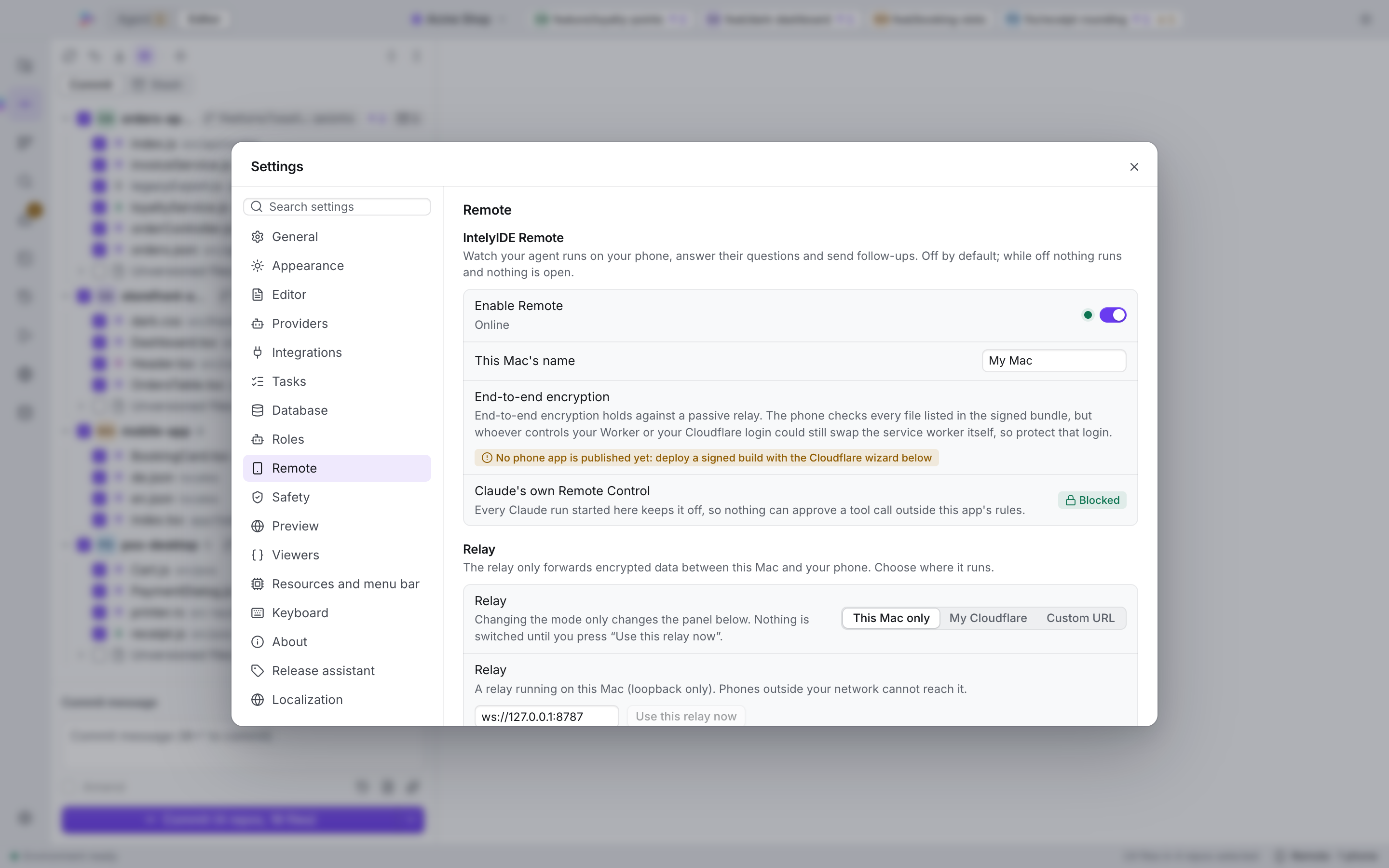
An optional, end-to-end-encrypted phone companion lets you watch agent runs and answer their questions away from your desk. You can run the relay on your own Cloudflare account.

  • Optional and off until you set it up
  • End-to-end encrypted
  • Relay on your own Cloudflare account
The phone companion showing an agent run in progress.

MongoDB Studio

Experimental: not yet verified against every real MongoDB setup, such as Atlas

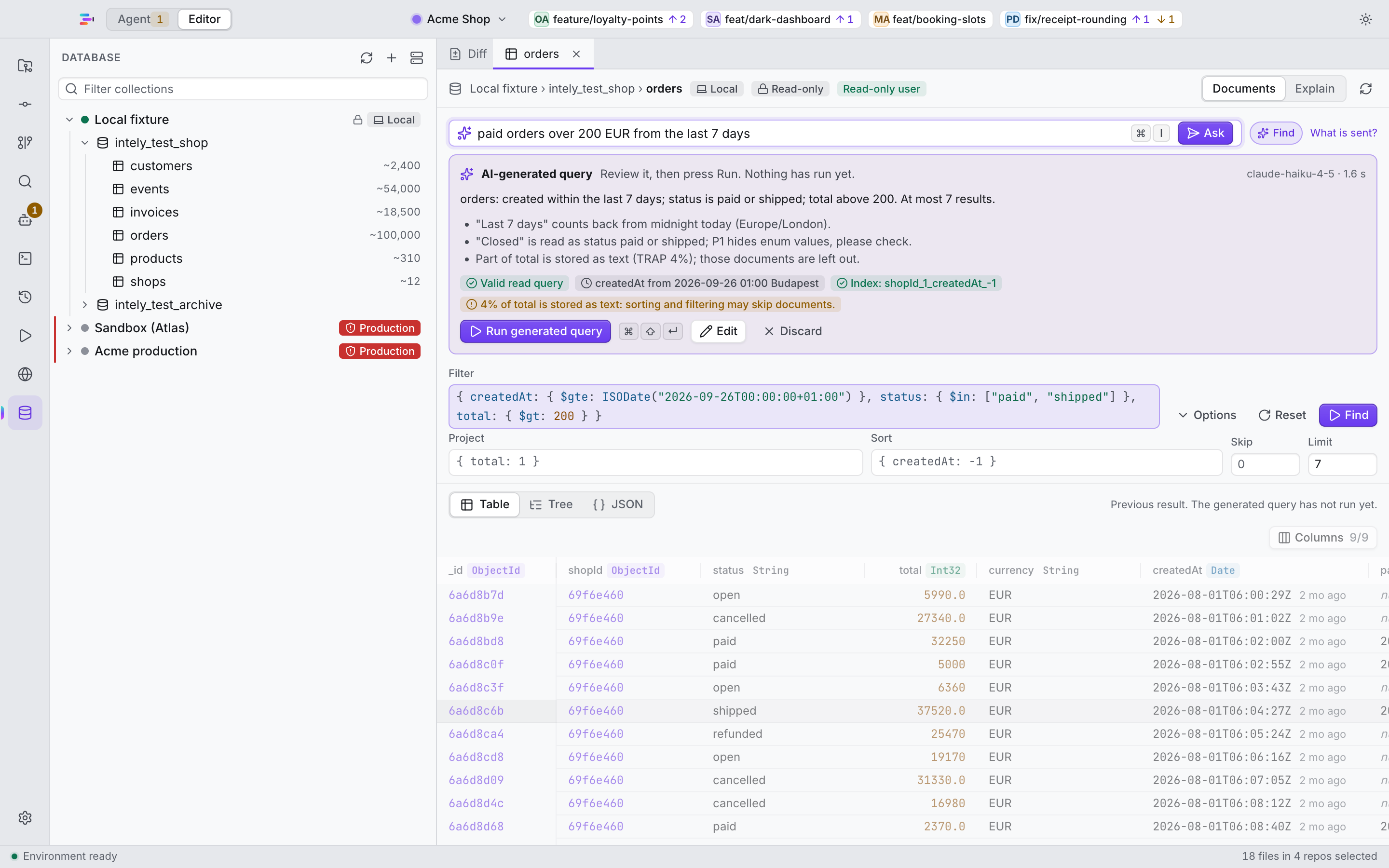
An optional MongoDB browser that is read-only by default. Describe the query you want, in English or in Hungarian, and the AI drafts it for you to review.

  • Read-only by default
  • AI-assisted query generation, including Hungarian prompts
  • SSH tunnels and TLS
MongoDB Studio showing a read-only query and its results.

API contract checks

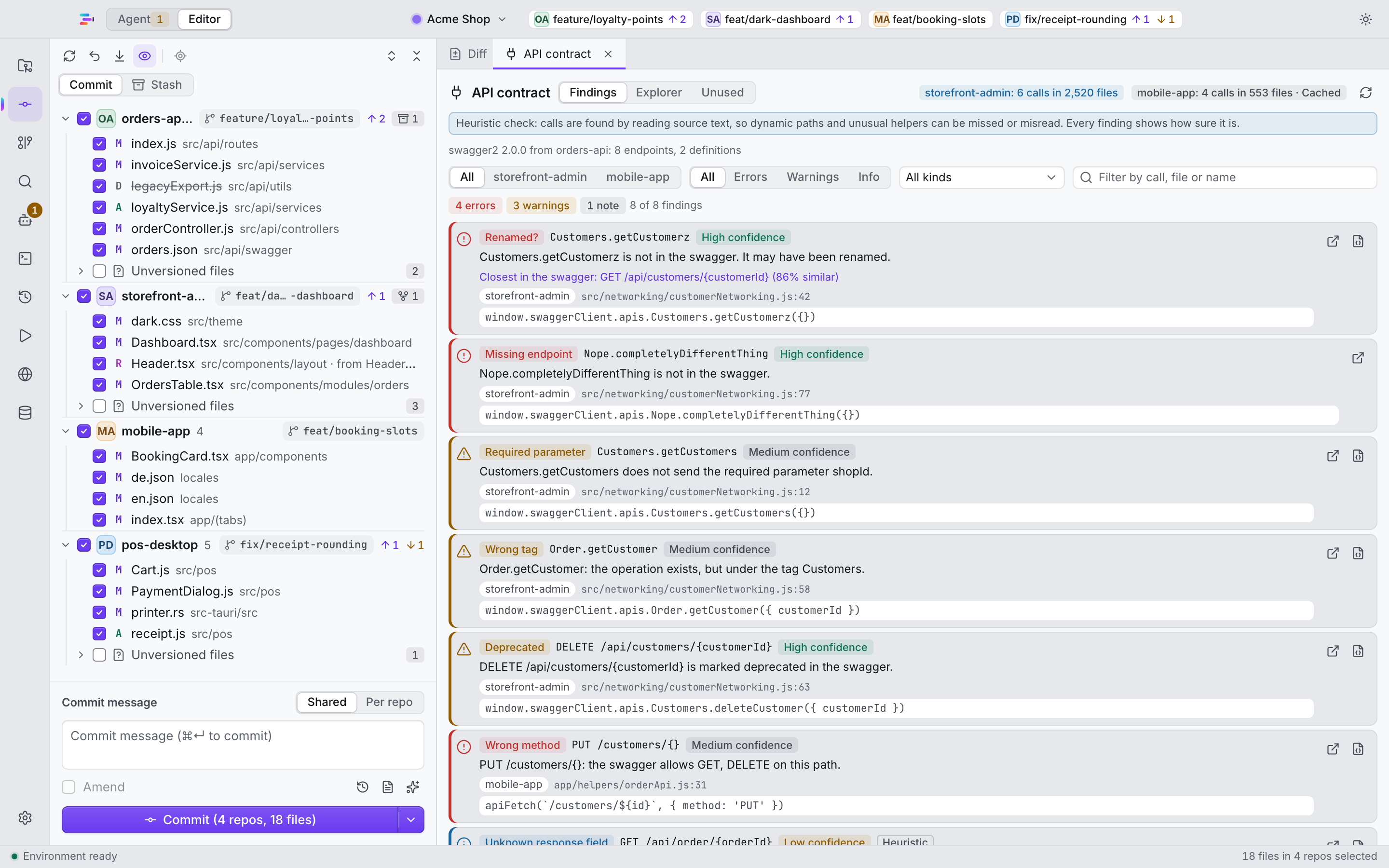
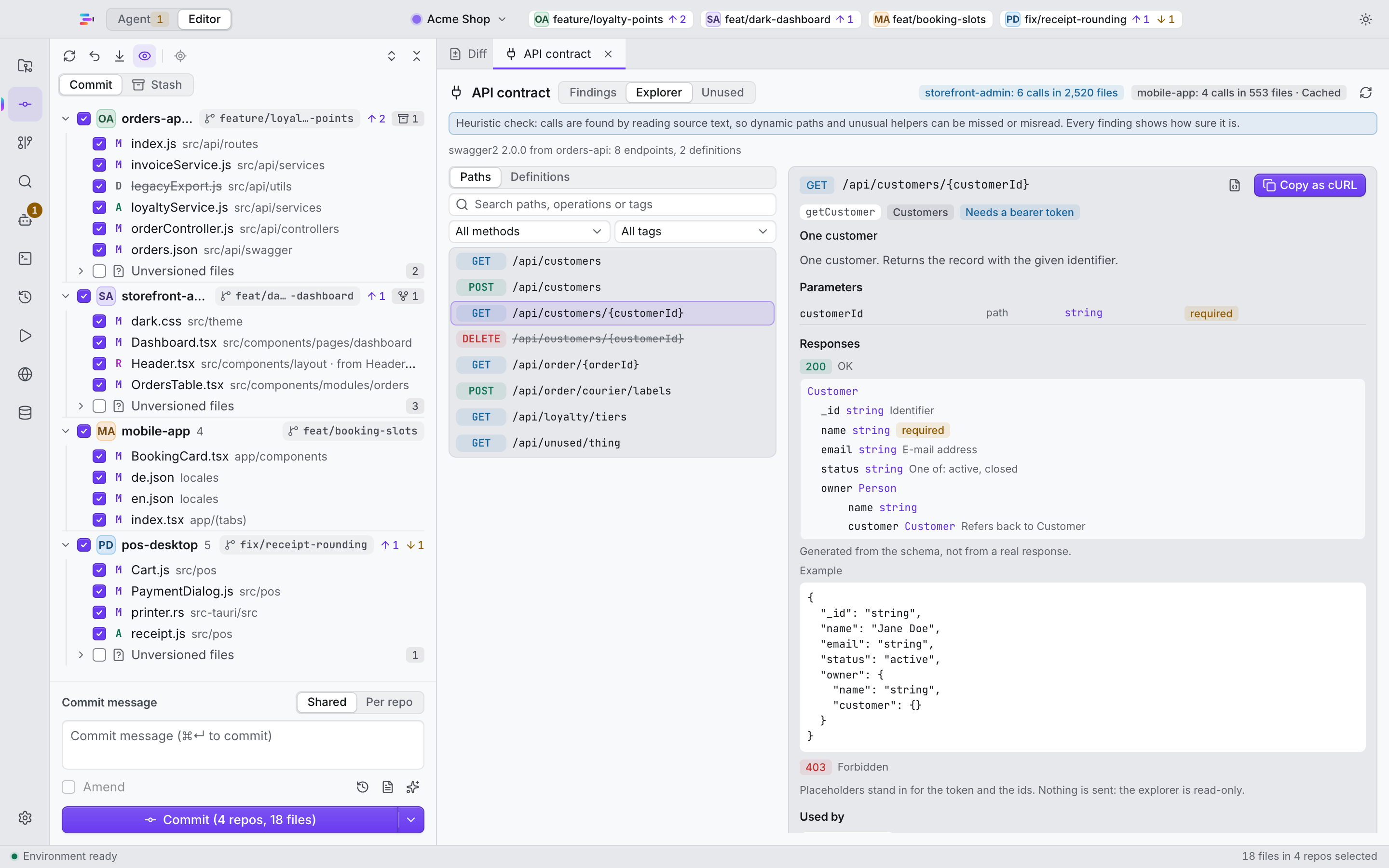
Backend and clients drift apart quietly. The API contract extra compares your backend’s Swagger with the client repositories and flags where they no longer match. A read-only Swagger explorer lets you browse the spec without leaving the IDE.

  • Contract-drift findings across repositories
  • Read-only Swagger explorer
  • Optional: switched on in Settings. While it is off, nothing is loaded or scanned.
The API contract view with the Swagger explorer and contract-drift findings.
The read-only Swagger explorer inside the IDE.

Bring your own agent

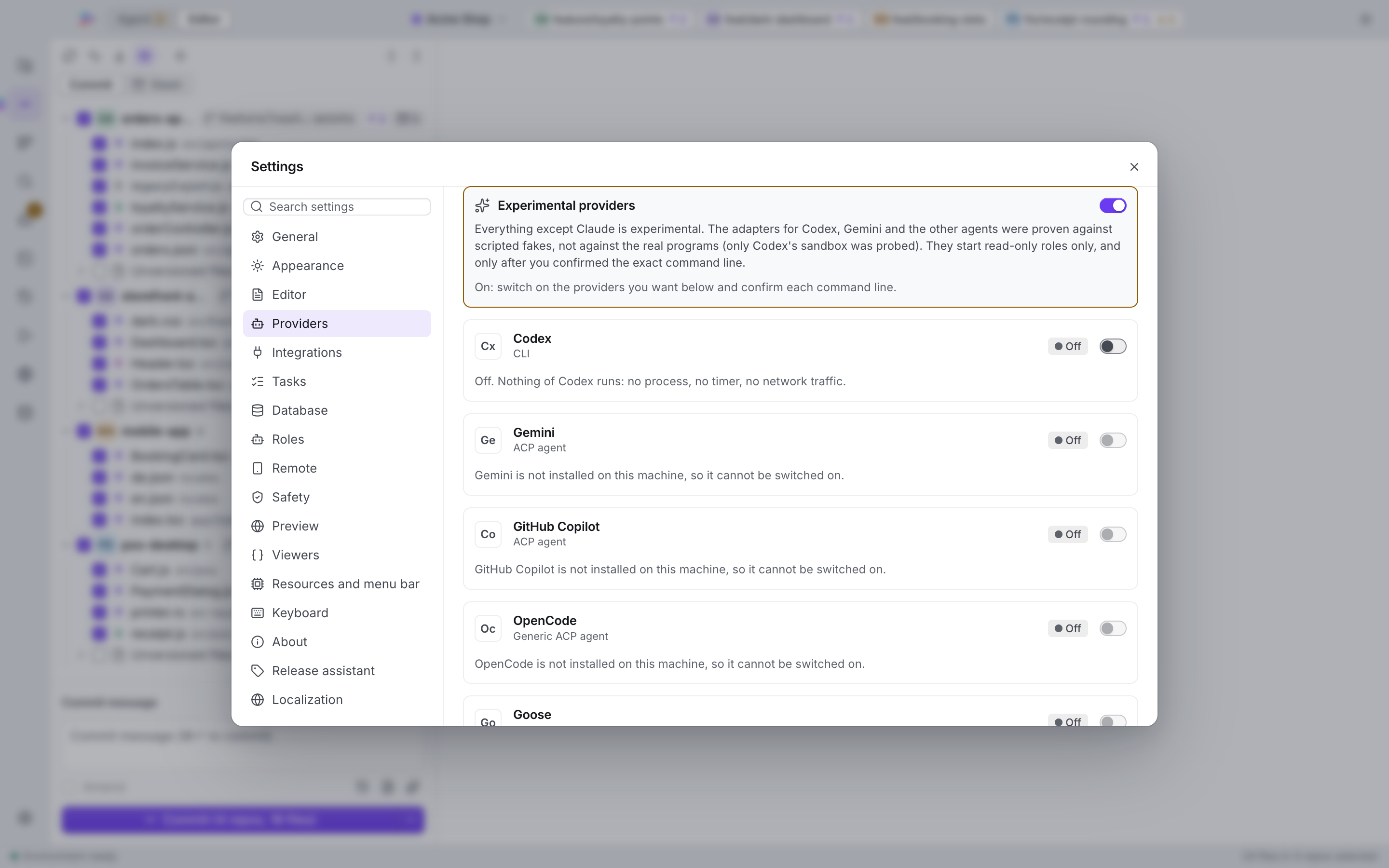
Claude is the main path. Other agent tools plug in as experimental providers that stay off until you switch them on.

  • ClaudeMain path
  • CodexExperimental
  • GeminiExperimental
  • GitHub CopilotExperimental
  • OpenCodeExperimental
  • GooseExperimental
  • QwenExperimental
  • Custom ACP agentExperimental
  • One global “Experimental providers” switch, off by default
  • You confirm each provider’s command line before it can run
  • Non-Claude providers are read-only by default and show an honest safety rating
  • Your own installs and accounts. IntelyIDE ships none of these tools.

Experimental: the experimental providers have not yet been verified against the real programs.

Settings, Providers: the provider cards and the Experimental providers switch.

And the rest of the toolbox

  • Editor and terminal
  • Search and diff
  • Pre-commit checks
  • Secret-in-diff warning
  • Branch hygiene
  • Worktrees
  • Localization checker
  • Release assistant
  • Session search
  • Night queue and morning brief
  • 53 interface languages
  • 11 accent colors and a custom one
  • Light and dark themes

English and Hungarian are hand-written. The other 51 languages are machine translated.

Built for trust

An agent can propose and edit. Only you commit and push.

  1. AgentReads and edits files in your repositories.
  2. PolicyPermission policy, hard stops, a git shim and hooks check each action.
  3. Your approvalAnything that needs a decision lands in the needs-you inbox.
  4. You commit and pushReview the diff, then commit and push yourself.

One click back

Every agent run starts with a Rewind snapshot. If a run goes the wrong way, restore the snapshot.

Best effort, not a guarantee

These layers work together, but they are best effort. They are not a security boundary guarantee. Read what an agent changed before you commit it.

Local-first

Your work stays on your machine. Credentials are stored in the macOS Keychain. IntelyIDE has no telemetry. Once a day, after a one-time notice, it asks the public GitHub API whether a newer release exists and sends nothing but its version number. You can turn that off.

Free and open source

IntelyIDE is licensed under GPL-3.0-or-later and free to download. Read the code, build it from source, report a bug or send a pull request.

Contribute

Pull requests are welcome. The maintainer reviews and approves every pull request manually before it is merged.

Install in 3 steps

  1. Download the .dmg

    Use the Download for macOS button. Optionally check the SHA-256 checksum first.

  2. Drag to Applications

    Open the .dmg, then drag IntelyIDE onto the Applications folder.

  3. Open it

    Start IntelyIDE from Applications. It will guide you through connecting your own Claude Code setup if you want agents.

Download for macOS

Questions

Is it free?

Yes. IntelyIDE is free to download and open source under GPL-3.0-or-later.

Does it send my code anywhere?

IntelyIDE itself has no servers. The agent features use your own Claude Code setup, which talks to Anthropic under your own account and terms. Remote is optional, end-to-end encrypted, and runs through a relay on your own Cloudflare account.

Does it work without AI?

Yes. Agents are optional. The multi-repo Changes tree, editor, terminal, search, diff and the rest work without one.

What do I need for the agents?

Your own Claude Code setup. The app guides you through connecting it. Other agent tools, such as Codex or Gemini, can be added as experimental providers. IntelyIDE ships none of them.

Does it run on Apple Silicon?

Yes. The current build is for Intel Macs (x64) and runs on Apple Silicon under Rosetta 2. See the architecture note next to the download button for the current state.

What about Windows and Linux?

Not right now. IntelyIDE is built and tested on macOS only.

How do I report a problem?

Open an issue on GitHub. Say which version you use and what you did before it happened. Questions go to GitHub Discussions. Report security problems privately through GitHub’s private vulnerability reporting.

Is it affiliated with Anthropic?

No. IntelyIDE is an independent project and is not affiliated with or endorsed by Anthropic.